ABC Guides
The agency benefits coordinator guides serve as a comprehensive resource for ABCs navigating Benefits Administration procedures.
Reminders
- Annual HIPAA training must be completed within 30 days of gaining access to Edison.
- New ABC training must be completed within 60 days of gaining access to Edison.
For New Hires
A full calendar month of employment must be completed before coverage begins.
The effective date will always be the first day of the month following the completion of one full calendar month of employment.
Note: If the hire date falls on the first day of the month, the effective date will be the first day of the following month.
For Terminations
Benefits terminate after the month in which the employee leaves. Use the last day of active pay status. If the termination is entered after payroll has been confirmed, we consider this a late termination and coverage will be extended until the end of the following month.
For New Hires
A full calendar month of employment must be completed before coverage begins. The effective date will always be the first day of the month after the employee completes one full calendar month of employment.
Note: If the hire date is on the first day of the month, then the effective date will be the first day of the following month.
For Terminations
Benefits terminate at the end of the next month that employment ends. The actual termination date should be entered in Edison. If employment ends on March 15, the insurance will terminate on April 30.
For New Hires
Each agency selects one of two options for when insurance coverage begins for newly hired employees:
The first day of the month following the hire date, or the first day of the second month following the hire date.
This selection is set at the agency level and applies to all newly hired employees.
ABCs enter the employee’s hire date into Edison, and Edison automatically calculates the insurance start date based on the agency’s selected option.
Note: If the hire date falls on the first day of the month, the effective date will be the first day of the following month.
For Terminations
When an employee terminates, ABCs can enter either the coverage end date or the last day of the previous month. The system will automatically fill in the other field with the matching termination date.
For New Hires
Agencies Without a Probationary Period
In Edison, ABCs would enter the hire date, and the coverage begin date would autocomplete based on the rule we have in the system. The coverage begin date is greyed out, so ABCs can only enter the hire date.
Agencies With a Probationary Period
A new hire’s eligibility date will depend on a 30/60/90 day probationary period.
Benefits will begin on the first day of the month after the adjusted hire date.
ABCs will enter the employee’s hire date. Edison will calculate the insurance start date using the probationary period we have on record.
If an agency changes its probationary period, it must notify the BA Service Center. This allows us to update the probationary period in Edison. If the service center is not notified, insurance start dates may be incorrect.
For Terminations
When an employee terminates, ABCs can enter either the coverage end date or the last day of the previous month. The system will automatically fill in the other field with the matching termination date.
Onboarding New Employees
When an employee is hired at your agency or an existing employee becomes eligible due to a status change, follow the employee checklist to enroll them in benefits:
- Employee Checklist for state/higher education ABCs
- Employee Checklist for local education ABCs
- Employee Checklist for local government ABCs
Agencies will use the checklist as a guide to review onboarding information with the employee. Both the ABC and the employee should sign the checklist. Maintain this for your records, either digitally or printed, and provide a copy to the employee.
The employee checklist information is also available as an acknowledgment in ESS. If the employee enrolls through ESS, you do not need to get a signed copy of the checklist.
To view the benefits orientation video, visit the New Employee page on the Partners for Health website.
Insurance Cards
Members can get additional cards by contacting their insurance carrier or logging in to their BCBS or Cigna account.
Members can also access digital cards using the carrier’s mobile app.
BlueCross BlueShield: Call 800.558.6213
BCBS provides two ID cards that are sent automatically. Both cards include the member’s name, and either card may be used by any covered dependent.
Cigna: Call 800.997.1617
Cigna provides separate ID cards for each covered family member. Cards include the participant’s name, and up to four cards may be mailed at one time.
Local Education agencies must enroll at least half of all eligible employees, plus one more person, in the Local Education Plan each year. This applies to employees who are joining the plan or continuing in it next year.
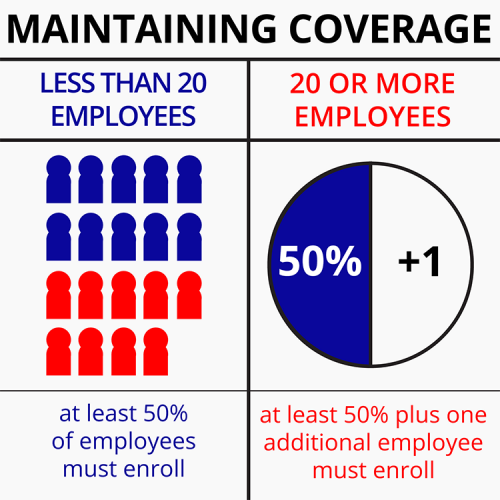
Local Government agencies must enroll at least half of all eligible employees, plus one more person, in the Local Government Plan each year.
If a Local Government agency has fewer than 20 employees, it only needs to enroll at least half of its eligible employees in the plan for the next year.
